Skip to content

Blog

devenv 1.4: Generating Nix Developer Environments Using AI

One of the main obstacles in using Nix for development environments is mastering the language itself. It takes time to become proficient writing Nix.

How about using AI to generate it instead:

$ devenv generate a Python project using Torch
• Generating devenv.nix and devenv.yaml, this should take about a minute ...

You can also use devenv.new to generate a new environment.

Generating devenv.nix for an existing project

Section titled “Generating devenv.nix for an existing project”

You can also tell devenv to create a scaffold based on your existing git source code:

$ devenv generate
• Generating devenv.nix and devenv.yaml, this should take about a minute ...

To continually enhance the AI’s recommendations, we collect anonymous data on the environments generated. This feedback helps us train better models and improve accuracy.

Of course, your privacy matters—if you prefer not to participate, just add the --disable-telemetry flag when generating environments. We also adhere to the donottrack standard.

Domen

devenv is switching its Nix implementation to Tvix

In February 2020, I went on a 16-day, 1200km moped trip across northern Thailand with a couple of friends.

Somewhere in northern Thailand
Somewhere in northern Thailand near Pai.

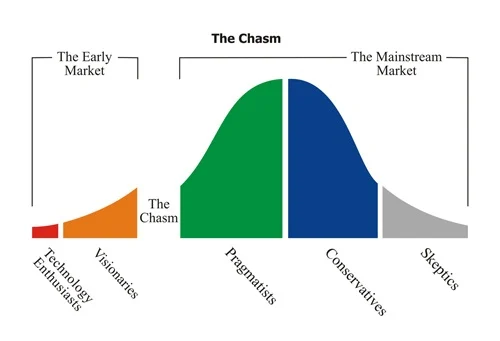
As we drove for hours on end, I was listening to an audiobook fittingly called Crossing the Chasm. The book explores the challenges faced by nacent technologies on their way to mainstream adoption.

Crossing the chasm

In the years that followed, I couldn’t help noticing the disconnect between Nix’s devoted user base and its apparent lack of widespread adoption in the broader tech community.

Over 2021 and 2022, I focused my efforts and started nix.dev, a resource for practical and accessible Nix tutorials, thinking that good documentation was the thing holding Nix back. Eventually, I came to the realization that improving documentation alone will only get us so far.

We needed to fix the foundations.

We needed to remove things to reduce the cognitive load when using Nix.

Over the years at Cachix we’ve talked to team after team abandoning Nix and have observed a surprisingly consistent pattern.

Nix is initially introduced by someone enthusiastic about the technology. Then, faced with a steep adoption curve, it is abandoned after backlash from the rest of the team.

Making it trivial for a project to adopt and maintain a development environment is crucial for other team members to see the benefits of Nix.

For example, Shopify was vocal about Nix way back in 2020, but eventually went quiet. Having companies like Shopify adopt Nix would be a major step forward for the whole ecosystem.

An interface as the heart of the Developer Experience

Section titled “An interface as the heart of the Developer Experience”

Since the 0.1 release two years ago, we’ve been rapidly iterating on a declarative interface for developer environments. We now have support for over 50 languages and 30 services:

devenv.nix
{ pkgs, config, ... }: {
packages = [
pkgs.cargo-watch
];
languages.rust = {
enable = true;
channel = "nightly";
rustflags = "-Z threads=8";
targets = [ "wasm32-unknown-unknown" ];
};
processes = {
backend.exec = "cargo watch -x run";
};
services = {
postgresql.enable = true;
};
}

With the introduction of tasks in the 1.2 release and Nix caching in 1.3, we’re pretty happy with the devenv command-line interface and the extensible nature of the module system.

The modular architecture of the module system allows for seamless addition, modification, and removal of configuration options. This flexibility extends to defining your own options for the software you’re writing.

We’ve been using the Nix command-line interface under the hood as a low-level API to the evaluator and Nix store. We would’ve preferred to use something akin to an SDK instead, however the command-line interface was the most sensible interface two years ago out of the available options.

The new C FFI (Foreign Function Interface) could potentially grow into a viable solution, but it would necessitate substantial development effort and still leave us vulnerable to memory-safety issues. Moreover, the architecture of the Nix codebase is structured more as a monolithic framework rather than a modular library.

Ideally, if we’re committing to fixing the developer experience over the next years, we’d want to have Nix implemented as a library in Rust.

Fortunately, such a project already exists and it’s called Tvix. Started by flokli and tazjin in “Rewriting Nix”, Tvix is a re-implementation of Nix in Rust, offering both memory-safety and a library-oriented architecture with independently usable components. Leveraging Rust’s abstractions and ecosystem (e.g. tracing.rs), Tvix is positioned to significantly enhance the developer experience for devenv developers and users.

There are many architectural differences besides the obvious “Rewrite In Rust” cliche, so we’ll talk about them as we start replacing our Nix command-line calls with Tvix libraries, starting with the evaluator.

The Nix evaluator directly traverses the abstract syntax tree (AST) during evaluation, while Tvix uses a bytecode virtual machine crafted according to the Crafting Interpreters book.

Tvix compiles Nix code into compact bytecode, then executes it in a virtual machine. This two-step approach offers potential performance benefits and optimization opportunities, like many other interpreted languages.

When you re-evaluate devenv.nix, you’re most likely changing devenv.nix and not one of the few dozen Nix files that come from the devenv repository, or even the few thousand Nix files from the nixpkgs repository that could all be cached as bytecode.

In order to integrate the Tvix evaluator with devenv we’ll need to:

  • Finish implementing builtins.fetchTree, where we have some ideas on how to simplify the caching layer and get rid of the annoying dependency on GitHub’s rate-limited api.github.com endpoint.
  • Implement an evaluation debugger that will allow inspecting a program’s state in case of errors.
  • Finish implementing tvix-eval-jobs that will be used for regression tests against nixpkgs to make sure that the evaluator behaves correctly.
  • Create debug tooling for when we discover regressions in the evaluator.
  • Integrate a nix-daemon layer to schedule builds.

We also recently streamed a Let’s explore the Tvix evaluator video for those interested in digging into the code.

Using language-specific package managers as the build system

Section titled “Using language-specific package managers as the build system”

Once we’ve integrated the evaluator, we can finally generalize building languages using Nix reproducible builds by running the underlying build system to generate Nix expressions:

graph TD
A[devenv];
A -->|Rust| C[Cargo];
A -->|JavaScript| D[npm];
A -->|PHP| E[Composer];
C -->|Cargo.lock| F{Nix};
D -->|package.json| F{Nix};
E -->|composer.lock| F{Nix};

In Build Systems à la Carte, Nix is labelled as a suspending task scheduler.

In the general case, the dependency graph is computed statically, but a dependency can declare its dependencies dynamically as part of the build by returning more Nix code.

That’s when evaluation and build phases start to mix, with evaluation depending on the result of a build, which is typically called import from derivation (as the naming comes from the implementation).

sequenceDiagram
autonumber
participant NixEvaluator as Nix evaluator
participant NixStore as Nix store
NixEvaluator->>NixEvaluator: evaluate
NixEvaluator->>NixStore: write derivation
NixStore->>NixStore: build
NixStore->>NixEvaluator: read derivation output
NixEvaluator->>NixEvaluator: evaluate

Since evaluation in Nix is single-threaded, the process described above gets blocked on each build requested during evaluation.

Implementing parallel evaluation in Tvix, after we figure out the architectural details of how it should work, will unlock the ability to support automatic conversion of language-specific build systems into Nix without sacrificing neither the developer experience, nor memory safety.

As we embark on this new chapter with Tvix, I’m reminded of the journey that brought us here. It’s been a decade since I wrote the we can do better blog post, highlighting the potential for improvement in configuration management and development environments, and I’m glad to see it all finally coming together.

Keep an eye out for updates and join the discussion:

Domen

devenv 1.3: Instant developer environments with Nix caching

Hot on the heels of the previous release of tasks, we’re releasing devenv 1.3! 🎉

This release brings precise caching to Nix evaluation, significantly speeding up developer environments.

Once cached, the results of a Nix eval or build can be recalled in single-digit milliseconds.

If any of the automatically-detected inputs change, the cache is invalidated and the build is performed.

Caching comparison

Behind the scenes, devenv now parses Nix’s internal logs to determine which files and directories were accessed during evaluation.

This approach is very much inspired by lorri, but doesn’t require a daemon running in the background.

The caching process works as follows:

  1. During Nix evaluation, devenv parses the Nix logs for any files and directories that are accessed.
  2. For each accessed path, we store:
    • the full path
    • a hash of the file contents
    • the last modification timestamp

This metadata is then saved to a SQLite database for quick retrieval.

When you run a devenv command, we:

  1. Check the database for all previously accessed paths
  2. Compare the current file hashes and timestamps to the stored values
  3. If any differences are detected, we invalidate the cache and perform a full re-evaluation
  4. If no differences are found, we use the cached results, significantly speeding up the process

This approach allows us to efficiently detect changes in your project, including:

  • Direct modifications to Nix files
  • Changes to imported files or directories
  • Updates to files read using Nix built-ins, like readFile or readDir

Comparison with Nix’s built-in flake evaluation cache

Section titled “Comparison with Nix’s built-in flake evaluation cache”

Nix’s built-in flake evaluation caches outputs based on the lock of the inputs, ignoring changes to Nix evaluation that often happen during development workflow.

Let’s take a closer look at how devenv’s new caching system compares to other popular tools in the Nix ecosystem. Running our own cache gives us more control and visibility over the caching process, and allows us to improve our integration with other tools, like direnv.

While lorri pioneered the approach of parsing Nix’s internal logs for caching, devenv builds on this concept, integrating caching as a built-in feature that works automatically without additional setup.

These tools excel at caching evaluated Nix environments, but have limitations in change detection:

  • Manual file watching: Users often need to manually specify which files to watch for changes.
  • Limited scope: They typically can’t detect changes in deeply nested imports or files read by Nix built-ins.

To leverage devenv’s caching capabilities with direnv, we’ve updated the .envrc file to utilize devenv’s new caching logic.

If you currently enjoy the convenience of our direnv integration to reload your development environment, make sure to update your .envrc to:

source_url "https://raw.githubusercontent.com/cachix/devenv/82c0147677e510b247d8b9165c54f73d32dfd899/direnvrc" "sha256-7u4iDd1nZpxL4tCzmPG0dQgC5V+/44Ba+tHkPob1v2k="
use devenv

to benefit from the new caching system.

nix develop currently remains the last bit that’s rather slow and uncacheable, particularly on macOS. We’re working on bringing its functionality in-house to further bring down the overhead of launching a cached shell to under 100ms.

Join us on Discord if you have any questions,

Domen & Sander

devenv 1.2: Tasks for convergent configuration with Nix

For devenv, our mission is to make Nix the ultimate tool for managing developer environments. Nix excels at congruent configuration, where the system state is fully described by declarative code.

However, the real world often throws curveballs. Side-effects like database migrations, one-off tasks such as data imports, or external API calls don’t always fit neatly into this paradigm. In these cases, we often resort to convergent configuration, where we define the desired end-state and let the system figure out how to get there.

To bridge this gap and make Nix more versatile, we’re introducing tasks. These allow you to handle those pesky real-world scenarios while still leveraging Nix’s powerful ecosystem.

Tasks interactive example

For example if you’d like to execute python code after virtualenv has been created:

devenv.nix
{ pkgs, lib, config, ... }: {
languages.python.enable = true;
languages.python.venv.enable = true;
tasks = {
"python:setup" = {
exec = "python ${pkgs.writeText "setup.py" ''
print("hello world")
''}";
after = [ "devenv:python:virtualenv" ];
};
"devenv:enterShell".after = [ "python:setup" ];
};
}

python:setup task executes before devenv:enterShell but after python:virtualenv task:

For all supported use cases see tasks documentation.

We’ve talked to many teams that dropped Nix after a while and they usually fit into two categories:

    1. Maintaining Nix was too complex and the team didn’t fully onboard, creating friction inside the teams.
    1. Went all-in Nix and it took a big toll on the team productivity.

While devenv already addresses (1), bridging the gap between Nix provided developer environments and existing devops tooling written in your favorite language is still an unsolved problem until now.

We’ve designed Task Server Protocol so that you can write tasks using your existing automation by providing an executable that exposes the tasks to devenv:

devenv.nix
{ pkgs, ... }:
let
myexecutable = pkgs.rustPlatform.buildRustPackage rec {
pname = "foo-bar";
version = "0.1";
cargoLock.lockFile = ./myexecutable/Cargo.lock;
src = pkgs.lib.cleanSource ./myexecutable;
}
in {
task.serverProtocol = [ "${myexecutable}/bin/myexecutable" ];
}

In a few weeks we’re planning to provide Rust TSP SDK with a full test suite so you can implement your own abstraction in your language of choice.

You can now use your preferred language for automation, running tasks with a simple devenv tasks run <names> command. This flexibility allows for more intuitive and maintainable scripts, tailored to your team’s familiarity.

For devenv itself, we’ll slowly transition from bash to Rust for internal glue code, enhancing performance and reliability. This change will make devenv more robust and easier to extend, ultimately providing you with a smoother development experience.

If you run devenv update on your existing repository you should already be using tasks, without needing to upgrade to devenv 1.2.

Domen

devenv 1.1: Nested Nix outputs using the module system

devenv 1.1 brings support for Nix outputs, matching the last missing piece of functionality with Flakes.

It was designed to make outputs extensible, nested, and buildable as a whole by default.

This allows exposing Nix packages for installation/consumption by other tools.

If you have a devenv with outputs like this:

devenv.nix
{ pkgs, ... }: {
outputs = {
myproject.myapp = import ./myapp { inherit pkgs; };
git = pkgs.git;
};
}

You can build all outputs by running:

Terminal window
$ devenv build
/nix/store/mzq5bpi49h26cy2mfj5a2r0q69fh3a9k-git-2.44.0
/nix/store/mzq5bpi49h26cy2mfj5a2r0q71fh3a9k-myapp-1.0

Or build specific attribute(s) by listing them explicitly:

Terminal window
$ devenv build outputs.git
/nix/store/mzq5bpi49h26cy2mfj5a2r0q69fh3a9k-git-2.44.0

This is useful for tools that need to find and install specific outputs.

By default, any derivation specified in outputs nested attributes set is recognized as an output.

You can define custom options as output types in devenv. These will be automatically detected and built:

devenv.nix
{ pkgs, lib, config, ... }: {
options = {
myapp.package = lib.mkOption {
type = config.lib.types.outputOf lib.types.package;
description = "The package for myapp";
default = import ./myapp { inherit pkgs; };
defaultText = "myapp-1.0";
};
};
config = {
outputs.git = pkgs.git;
}
}

Building will pick up all outputs, in this case myapp.package and outputs.git:

Terminal window
$ devenv build
/nix/store/mzq5bpi49h26cy2mfj5a2r0q69fh3a9k-myapp-1.0
/nix/store/mzq5bpi49h26cy2mfj5a2r0q69fh3a9k-git-2.44.0

If you don’t want to specify the output type, you can just use config.lib.types.output.

If you import another devenv.nix file, the outputs will be merged together, allowing you to compose a developer environment and outputs in one logical unit.

You could also import outputs from other applications as inputs instead of composing them.

Leave a thumbs on the issue if you’d like to see it happen.

See Outputs section in documentation for the latest comprehensive guide to outputs.

We’re on Discord if you need help, Domen